이번 레슨2에서는 딥러닝을 실생활에 적용해보고, 장점과 한계를 알아보려고 한다.
*목차
[1. starting your project]
[2. state of deep learning]
[3. drivetrain approach]
[4. gathering data]
[5. DataLoaders]
[1. starting your project]
시작부터 완벽한 데이터를 모으려고 하지말고 그냥 일단 시작해라.
GUI나 데이터셋에 라벨링하는 것도 다 필요없고 일단 시작해라.
시작을 해봐야 어디가 막히는 지 알 수 있다.
이것을 "end to end iteration approach"라고 한다.
초기의 데이터 상황은 아래와 같이 4가지로 나누어지는데 3번의 상황은 피하는 게 좋다.
1데이터가 있다면
2캐글같은 곳에 이미 완성된 프로젝트가 있다면
3데이터를 찾지 못한다면
4비슷한 도메인으로부터 데이터를 찾을 수 있다면
[2.state of deep learning]
여러 분야가 있다. 그 중에서 비전에 대해서만 이야기해보고자 한다.
컴퓨터 비전에서는 딥러닝을 통해서 object recognition, object detection(segmentation) 를 할 수 있다.
객체를 사람, 물건 등으로 인식(recognize)할 수 있고, 인식한 객체를 강조하며 이름을 붙일 수 있다(detection)는 것이다.
한계도 있는데, training data에 흰-검의 이미지가 없었다면 모델은 흰-검 이미지에 취약하다.
포인트1. 이렇게 모델의 training data에 없던 다른 데이터를 "out of domain data"라고 한다.
포인트2. data augmentation을 사용하면 노이즈를 추가하므로 도움이 된다.
포인트3. 컴퓨터 비전 문제로 보이지 않아도 이미지화 할 수 있다면 컴퓨터 비전으로 해결가능하다.
나머지 분야는 나중에 읽어보자.
[3. drivetrain approach]
접근법 아이디어.
가장 먼저 objective에 대해서 생각을 해보고, 그리고 어떤 행동을 취해야 objective에 도움이 될지 또 어떤 데이터가 도움이 될지를 생각해본 후, 가장 좋은 결과를 만들 수 있는 행동을 취하는 모델을 만드는 것이다.
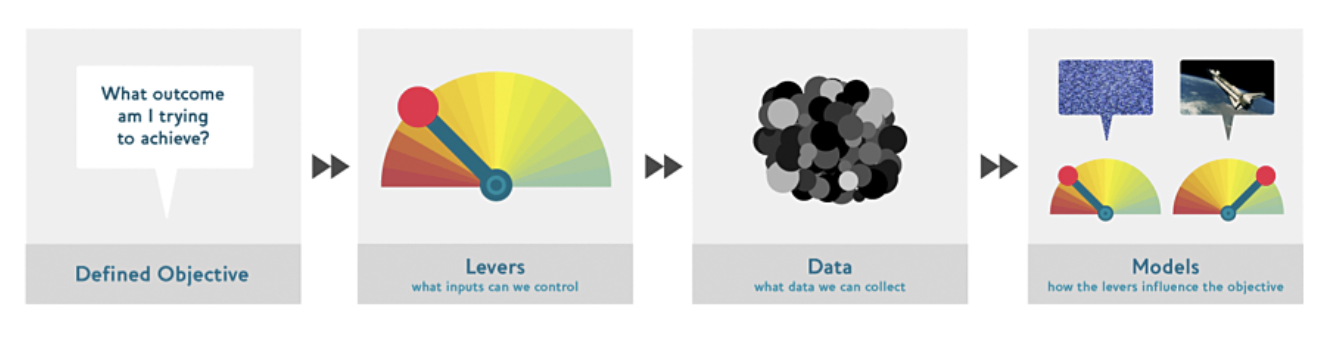
분명한 목표를 가지고 데이터를 분석한 예시로는 구글의 자율주행자동차 프로젝트가 있습니다. 구글은 "무인으로 자동차를 A지점에서 B지점까지 이동시킨다" 라는 목적을 가장 먼저 정했습니다. 이러한 접근을 Drivetrain Approach 라고 부를 수 있습니다.
구글 예시
1번. 목적은 "검색과 가장 관련된 결과를 보여주는 것이다."
2번. levers를 ranking of the search results로 하였다.
3번. ranking을 위하여 어떤 데이터가 필요한지 고민
4번. 위 1 - 3번을 통해서 모델을 정한다.
이외에도 예시들이 있으니 주피터 노트북에서 확인하자.
->참고
The objective of a recommendation engine is to drive additional sales by surprising and delighting the customer with recommendations of items they would not have purchased without the recommendation. The lever is the ranking of the recommendations. New data must be collected to generate recommendations that will cause new sales . This will require conducting many randomized experiments in order to collect data about a wide range of recommendations for a wide range of customers. This is a step that few organizations take; but without it, you don’t have the information you need to actually optimize recommendations based on your true objective (more sales!)
[4. gathering data]
bear detector을 만들어보려고 한다.
곰은 grizzly, black, and teddy bears가 있고, 곰 사진은 인터넷으로부터 자유롭게 다운 받을 수 있는데 한 가지 방법을 소개해주고자 한다.
=> Bing Image Search: 1000쿼리를 한달마다 다운받을 수 있는데 1쿼리는 150이미지다.
bing image search을 통하여 이미지를 다운받으려고 한다.
key = os.environ.get('AZURE_SEARCH_KEY', 'xxx')
key를 가지면 search_images_bing 메소드(utils 클래스에 포함된 상태)를 사용할 수 있다. (1시간 17분)
results = search_images_bing(key, 'grizzly bear')
ims = results.attrgot('content_url')
len(ims)
150개의 grizzly bears의 url을 다운받았다.
(참고)
forums.fast.ai/t/l-attrgot/77678/12
bear_types = 'grizzly','black','teddy'
path = Path('bears')
if not path.exists():
path.mkdir()
for o in bear_types:
dest = (path/o)
dest.mkdir(exist_ok=True)
results = search_images_bing(key, f'{o} bear')
download_images(dest, urls=results.attrgot('contentUrl'))
세 종류의 곰을 모두 다운받는 것 같다.
fns = get_image_files(path)
fns
failed = verify_images(fns)
failed
손생된 이미지 파일들(type L)이다.
이를 삭제하기 위해서 failed.map(Path.unlink);
sidebar과 end sidebar도 확인하자.
[5. DataLoaders]
이 클래스는 dataloader 객체를 자유롭게 받을 수 있고, 그것들을 train혹은 valid를 사용할 수 있다.
dataloaders객체를 위해서는 다음의 4가지가 필요하다.
어떤 타입의 데이터에 대해서 작업을 하는 지
아이템 리스트를 어떻게 얻을 수 있는 지
아이템에 라벨링을 어떻게 할 수 있는지
validation set을 어떻게 만들 수 있는지
우리는 지금까지 factory method를 사용해왔다.
factory method가 쓰이지 않는 곳에서는 data block API를 사용할 수 있다.
dataloaers를 사용자 마음대로 만들 수 있다.
bears = DataBlock(
blocks = (ImageBlock, CategoryBlock),
get_items = get_image_files,
splitter = RandomSplitter(valid_pct = 0.2, seed = 42),
get_y = parent_label,
item_tfms = Resize(128))
The independent variable is the thing we are using to make predictions from, and the dependent variable is our target.
For this DataLoaders our underlying items will be file paths.
The get_image_files function takes a path, and returns a list of all of the images in that path
Sometimes this is done by placing the images for the training and validation sets into different folders
we are telling fastai what function to call to create the labels in our dataset:
parent_label is a function provided by fastai that simply gets the name of the folder a file is in.
Our images are all different sizes, and this is a problem for deep learning: we don't feed the model one image at a time but several of them (what we call a mini-batch). To group them in a big array (usually called a tensor) that is going to go through our model, they all need to be of the same size. So, we need to add a transform
This command has given us a DataBlock object. This is like a template for creating a DataLoaders. We still need to tell fastai the actual source of our data—in this case, the path where the images can be found:
dls = bears.dataloaders(path)
datablock is like a template for creating dataloaders
DataLoader is a class that provides batches of a few items at a time to the GPU.
최대 64개가 있다고 한다.
'이제는 사용하지 않는 공부방 > Artificial intelligence' 카테고리의 다른 글
| [추천시스템] 컨텐츠 기반 추천시스템 TF-IDF (0) | 2021.04.19 |
|---|---|
| [fast ai] chapter9_tabular modeling (0) | 2021.04.18 |
| fastai vision tutorial/ Points (1) | 2021.01.16 |
| fastai vision tutorial/segmentation (1) | 2021.01.15 |
| fastai vision tutorial/multi-label classification (1) | 2021.01.15 |